

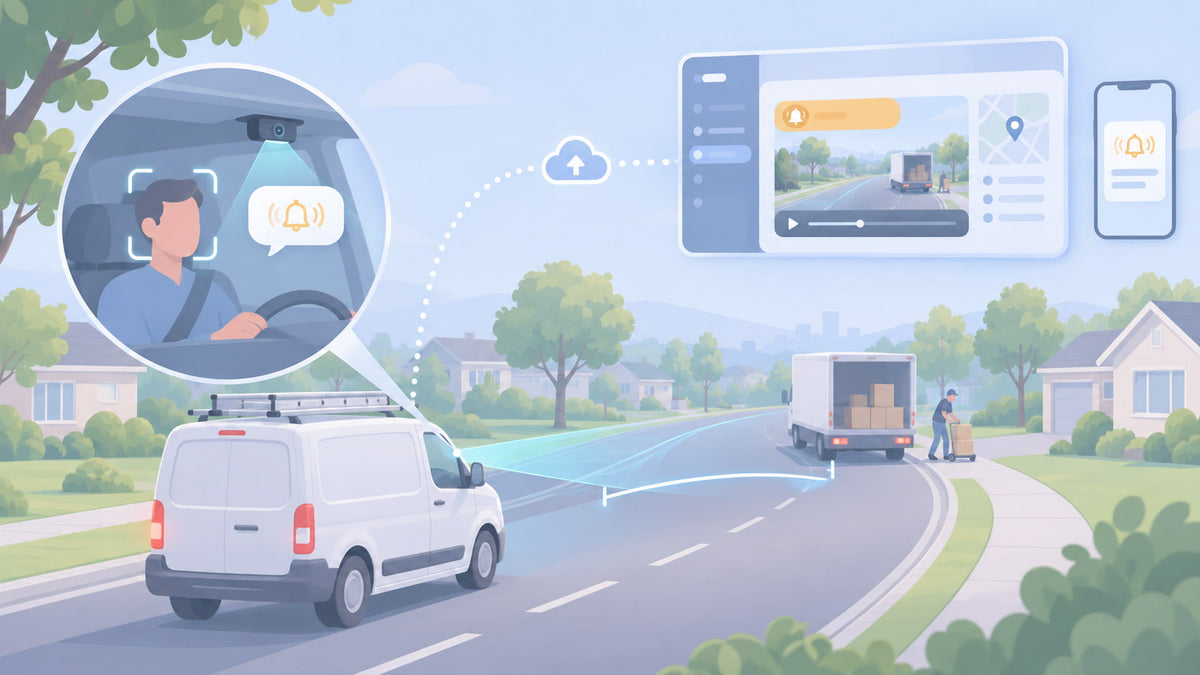
An AI dash cam is sold as one feature, but it is really three separate systems sharing a windshield mount. One watches the road. One watches the driver. And one, the part most people never think about, is not AI at all: it is a motion sensor that feels the van brake, swerve or hit something. Knowing which system caught an event tells you how much to trust it, why it sometimes gets things wrong, and what you can do about it.
This guide follows a single event through an AI dash cam in 2026, from the moment the camera sees it to the alert in the cab and the clip on your phone. It covers what each part detects, where false alerts come from, and what these cameras still cannot do, so you know what you are buying before the first month of alerts arrives.
Spytec GPS is a self-serve GPS fleet tracking platform for small and mid-size service fleets, with free hardware, transparent published pricing and online checkout. Its Pulse Vision AI dash cam is a dual-lens 4G LTE camera with built-in GPS tracking, road and driver AI events, spoken in-cab alerts and automatic cloud video upload, at $399.95 per camera per year.
What an AI dash cam actually is
A regular dash cam records. An AI dash cam records and also decides: it watches for specific situations, labels them as events, warns the driver when it matters, and sends you the clip. The "AI" part is computer vision, software trained to recognize things in video such as a car ahead, a lane line, a face, closed eyes or a phone in a hand.
On most fleet AI dash cams, that software runs on the camera itself rather than in the cloud. That matters for one reason: speed. A warning about the car stopping ahead is useless if it has to travel to a server and back first. Running detection in the camera is what lets it speak up in the cab while the moment is still happening, even where cell coverage is weak.
The three systems inside break down like this:
| System | What it uses | What it catches |
|---|---|---|
| Road-facing AI (ADAS) | The forward lens and computer vision | Forward collision risk, following too closely |
| Driver-facing AI (DMS) | The inward lens and computer vision | Phone use, drowsiness, distraction, smoking |
| Motion and GPS sensors | An accelerometer (G-sensor) and GPS speed | Harsh braking, acceleration and turning, crashes and impacts, speeding |
That last row surprises people. Some of the most common "AI events" do not come from the camera's eyes at all. A harsh-brake alert fires because the sensor felt the van decelerate hard, and the camera simply saves the video around that moment. That is why it is so reliable at catching hard stops, and also why it cannot tell whether the stop was reckless or the only thing that kept your driver out of an accident.
How the road-facing camera works (ADAS)
ADAS stands for advanced driver assistance systems. On a dash cam, it means the forward lens is doing more than recording. The software finds vehicles in the frame, estimates how far away they are and how fast the gap is closing, and works out how many seconds the van has before it reaches them.
- Forward collision warning. When the gap is closing fast enough that the driver needs to brake now, the camera warns them. On Pulse Vision this is a spoken alert in the cab, timed to the moment, not a note in a report.
- Following too closely. The same distance math, applied to steady driving. Tailgating at highway speed is one of the most common causes of rear-end crashes, and one of the easiest habits to coach once you can see it.
Some cameras also warn on lane departure. For most local service fleets, forward collision and following distance are the road events that pay off, because they line up with the crashes small fleets actually have.
How the driver-facing camera works (DMS)
DMS stands for driver monitoring system. The inward lens tracks the driver's face, eyes and head position, and looks for specific objects. Each event is a pattern held for a few seconds, not a single frame:
- Phone use. A phone in hand near the face or held down in the lap while the van is moving.
- Drowsiness. Eyes closing for longer than a blink, or repeated yawning. This matters most on early starts and long days.
- Distraction. Eyes and head turned away from the road for longer than a normal mirror check.
- Smoking. A cigarette in hand or at the mouth, which is a policy issue in most company vehicles.
On Pulse Vision, phone use, drowsiness and distraction trigger a spoken alert in the cab as they happen. That is where the value is. A report you read on Friday tells you what went wrong on Tuesday. A voice in the cab gets the phone put down while it still matters. Whether to turn the inward lens on at all is a separate decision, covered in what a driver-facing camera catches, and recording laws vary by state, so check dash cam laws by state before you switch it on.
Road and driver AI events, spoken alerts and GPS in one camera. Pulse Vision is $399.95 per camera per year with free hardware. Every AI event is included; none is a paid add-on.
Following one event: from the lens to your phone
Here is what happens when a driver picks up a phone at 40 mph, step by step. Every AI dash cam works through some version of these four stages, and each one is a place where you have some control.
1. Detect
The inward lens sees a phone in hand near the driver's face. The software checks that the van is moving and that the pattern holds for a few seconds, so a quick glance at a ringing phone in the cup holder does not count.
2. Decide
The camera compares what it saw against the event's sensitivity setting. Higher sensitivity flags shorter or less certain moments; lower sensitivity waits for a clear, sustained pattern. This one setting decides whether the system is useful or noisy. On Pulse Vision you can change it, and turn each event on or off.
3. Alert the driver
If the event qualifies, the camera speaks up in the cab right away. Most drivers correct on the spot, and most stop doing it once they know the camera will say something every time.
4. Record and send
The camera clips the seconds around the event and uploads the video over 4G LTE. On Pulse Vision it lands in your dashboard within minutes, tagged with the event and the lens that recorded it, and you can choose which events notify you and which upload video. How that upload works, and what to set before you buy, is covered in dash cam cloud storage and events.
Harsh braking skips stage 1's computer vision entirely. The motion sensor detects the deceleration, the sensitivity threshold decides whether it was hard enough to count, and the camera saves and sends the video from both lenses. Same four stages, different sensor.
Why AI dash cams give false alerts
Every AI dash cam produces some alerts that are wrong. Knowing where they come from tells you which ones a settings change will fix.
- Hands near the face. Scratching a cheek, eating, or holding a radio can look like a phone call for a moment. A slightly lower phone-use sensitivity usually clears most of these.
- Sunglasses, glare and night driving. Eye-based events like drowsiness depend on the camera seeing the eyes. Dark lenses, a low sun or a poorly aimed inward lens make that harder.
- Stop-and-go traffic. A harsh-brake threshold set for open highway fires constantly downtown. A city plumbing van and a rural landscaping truck should not share the same setting.
- Potholes, curbs and job-site roads. The motion sensor feels every jolt. Rough gravel lots can read as harsh turns or even impacts if sensitivity is set too high.
- Mounting. A camera mounted crooked, too low or behind a tinted strip misjudges distance on the road side and loses the driver's face on the inward side. Most early false alerts on a new install come back to the mount.
The fix is almost never to turn an event off. It is to give the first two weeks a look, find which events are noisy on which vehicles, and adjust sensitivity until the alerts you get are ones you would act on. Drivers stop listening to a camera that cries wolf, so tuning protects the alerts that matter.
What an AI dash cam cannot do
- It does not decide fault. It records what happened and flags patterns. Whether your driver was at fault is still a judgment for you, your insurer, or a court. What the video does is make that judgment fast and hard to argue with.
- It only sees what its lenses point at. A forward and an inward lens do not cover the sides or the rear of the van, so a sideswipe in a parking lot may show up as an impact with little useful video.
- It does not coach for you. The in-cab alert handles the moment. Changing habits still takes a short conversation, using the clip. Our 15-minute weekly driver coaching routine shows how small fleets do it without a safety manager.
- It does not catch everything. A camera flags the events it is built to recognize. If a customer reports something the camera did not flag, request the footage for that time window while it is still on the camera's card.
What an AI dash cam costs a small fleet
Pulse Vision is $399.95 per camera per year, about $33.33 a month, on an annual plan only, because cellular video upload uses more data than a GPS tracker. The camera itself is free, and every road and driver AI event is included. Volume discounts apply automatically at checkout: 5% at 5 devices, 10% at 10, 15% at 25, 20% at 50 and 25% at 100, counted across every device in your cart, trackers included. At 10 cameras that works out to about $30.00 per camera per month. It plugs into the OBD port and mounts to the windshield in under 5 minutes, with a 30-day money-back guarantee.
Pulse Vision also tracks the vehicle with built-in GPS, so it can replace a separate tracker in the vans that get a camera. For the rest of the fleet, the Pulse OBD tracker is $8.95 per vehicle per month on the annual plan or $14.95 month to month, and both count toward the same volume discount. To see how other camera systems price out, read best fleet dash cams for small service fleets. Every plan is on the pricing page.
FAQ
What is an AI dash cam?
An AI dash cam is a dash camera that uses computer vision to recognize risky situations on the road and in the cab, such as a car stopping ahead, phone use or drowsiness. It warns the driver, labels the event and uploads a video clip so the owner can review it. Most fleet AI dash cams combine a road-facing lens, a driver-facing lens and a motion sensor.
What is the difference between ADAS and DMS on a dash cam?
ADAS (advanced driver assistance systems) uses the road-facing lens to warn about hazards ahead, such as forward collision risk and following too closely. DMS (driver monitoring system) uses the driver-facing lens to watch for phone use, drowsiness, distraction and smoking. A dual-lens AI dash cam like Spytec's Pulse Vision runs both.
Do AI dash cams alert the driver in real time?
Good fleet AI dash cams do. Spytec's Pulse Vision gives a spoken alert in the cab for forward collision warning, phone use, drowsiness and distraction as they happen, so the driver can correct immediately instead of hearing about it in a weekly report.
Why does my AI dash cam give false alerts?
Most false alerts come from sensitivity set too high for how a vehicle drives, hands near the face that look like phone use, sunglasses or glare that hide the eyes, rough roads that jolt the motion sensor, or a poorly aimed camera. Adjusting event sensitivity per vehicle and checking the mount clear most of them.
Is harsh braking detected by AI?
Usually not. Harsh braking, harsh acceleration, harsh turning and crashes are detected by the dash cam's accelerometer, which feels the vehicle's motion. The camera then saves video from around that moment. Computer vision handles events that need to be seen, like phone use or following distance.
How much does an AI dash cam cost for a small fleet?
Spytec's Pulse Vision AI dash cam costs $399.95 per camera per year (about $33.33 a month) with free hardware and all AI events included. Automatic volume discounts start at 5% for 5 devices and reach 10% at 10, which brings the price to about $30.00 per camera per month.
The bottom line
An AI dash cam is a road camera, a driver camera and a motion sensor working together, and each one is good at different things. The road side catches closing gaps, the driver side catches phones and tired eyes, and the motion sensor catches every hard stop and bump, fair or not. What turns all of that into fewer incidents is the part you control: sensitivity tuned to each vehicle, alerts that reach the driver in the moment, and clips you actually watch. In 2026 that matters more than any spec sheet number.
AI events you can tune, spoken alerts in the cab, GPS built in. Pulse Vision is $399.95 per camera per year with free hardware and a 30-day money-back guarantee. No sales calls.






Share:
Dash Cam With Cloud Storage: Why Events Matter More Than the Cloud (2026)