

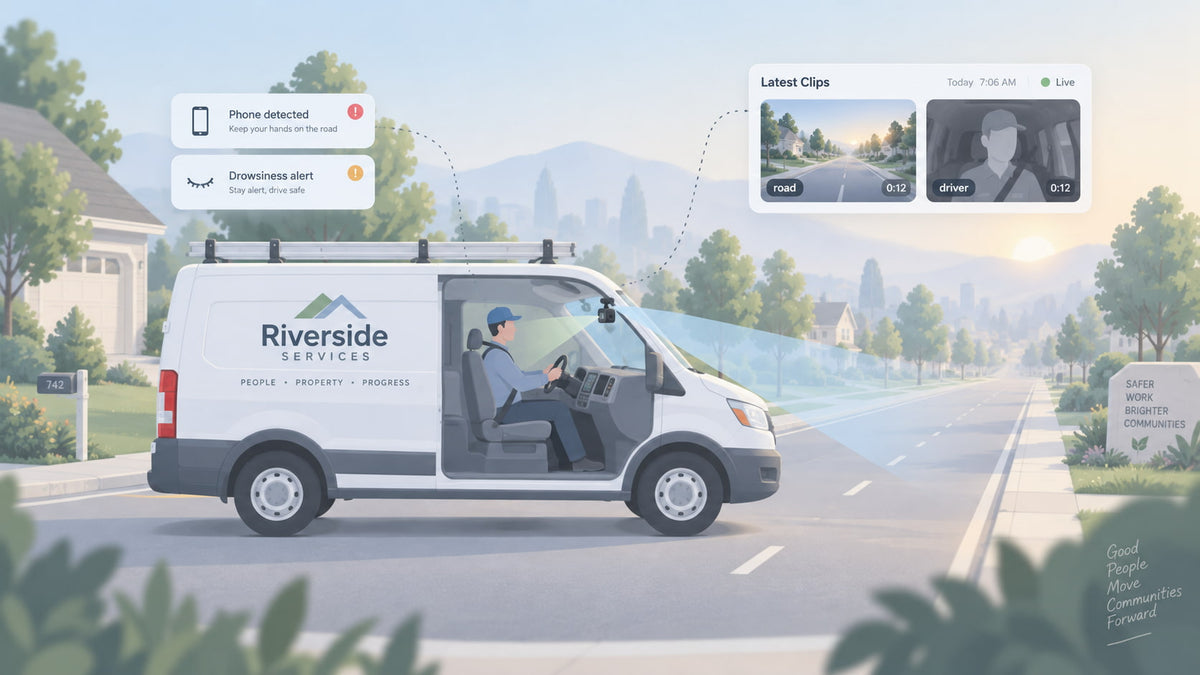
You bought a dash cam to see the road. Open the box and there is a second, smaller camera in it, built to point at your driver. Most small fleet owners stall right there. Plugging it in feels like a step past "protecting the business" and toward "watching my guys," and nobody wants to be the boss who did that.
This guide settles the question with specifics instead of feelings: what a driver-facing camera catches that a road camera can't, what happens when it catches something, what it doesn't do, and a simple way to decide whether your trucks should have it switched on in 2026.
Spytec GPS is a self-serve GPS fleet tracking platform built for small and mid-size fleets, with free hardware on every plan, no contracts, and transparent published pricing. Its Pulse Vision AI dash cam ships with both a road-facing camera and a detachable driver-facing camera, so for Spytec customers the driver camera is not an extra purchase. It is a decision.
What a driver-facing camera is
A driver-facing camera (also called an inward-facing or cabin camera) is a second lens mounted at the windshield that looks back at the driver's seat. On an AI dash cam it does more than record. Software watches the driver's face and hands and flags specific behaviors as they happen.
The road camera answers "what happened in front of the truck." The driver-facing camera answers "what was the driver doing when it happened." Those are different questions, and most of the arguments for and against the cabin lens come down to whether you need the second answer.
What a driver-facing camera catches that a road camera can't
A road camera sees a hard brake, a near miss or a collision. It cannot see why. These are the behaviors the Pulse Vision driver-facing camera is built to detect.
Phone use
A road-only camera shows the truck drifting or braking late. The cabin camera shows the phone in the driver's hand. Distraction is not a small-fleet edge case: NHTSA reports that 3,208 people were killed and 315,167 were injured in crashes involving distracted drivers in 2024.
Drowsiness
The camera watches for eye closure and yawning. This matters most for fleets with early starts, long drives between jobs, or techs coming off an overnight emergency call. NHTSA counted 644 deaths in drowsy-driving crashes in 2024 and says reported numbers are an underestimate, because drowsiness is hard to prove after the fact. A camera that saw the driver's eyes close is the proof.
Smoking
If you run a no-smoking policy in company vehicles, the driver-facing camera flags smoking in the cab. If you don't care, it's one alert you'll rarely think about.
The "why" behind every hard brake
This is the one owners underrate. When a customer or another driver claims your tech wasn't paying attention, a road clip shows the brake and the cabin clip shows where your driver's eyes were. Sometimes that clears your driver. Sometimes it confirms the problem. Either way you stop guessing. For how footage holds up after a crash, see how dash cam footage protects your business in court.
What happens when the driver-facing camera catches something
Owners often picture a manager staring at a live feed of every driver all day. That is not how it works in practice. On Pulse Vision, a detection sets off two things.
- The driver hears it first. Pulse Vision alerts the driver out loud in the cab for phone use, drowsiness and distraction, and warns before impact when the truck is closing on a hazard ahead. Most of the time the phone goes down and nothing else happens.
- You get the clip. AI events are clipped and uploaded over 4G LTE and show up in your dashboard within minutes. In the Hapn app's Media Library, each item shows which camera recorded it, road-facing or driver-facing, and the event behind it.
Everything else stays on the camera's memory card. If you need to see a specific moment that wasn't flagged, you can request footage for that time window and choose the Driver or Road lens. The card records over the oldest footage as it fills, so pull anything that matters the same day.
| Situation | Road camera only | Road + driver-facing camera |
|---|---|---|
| Driver picks up a phone | Nothing, unless it leads to a hard brake or drift | Spoken alert in the cab, clip uploaded |
| Driver starts to nod off | Nothing until something goes wrong | Spoken alert in the cab, you're notified |
| Truck closes too fast on the vehicle ahead | Forward collision warning | Forward collision warning, plus what the driver was doing |
| Collision or "he wasn't looking" claim | Shows the road and the impact | Shows the road, the impact and the driver's attention |
| Hard braking and speeding patterns | Captured | Captured |
What a driver-facing camera doesn't do
Being clear about the limits helps the decision and helps the conversation with your drivers.
- It doesn't record sound unless you turn audio on. Audio is a separate setting you can enable or disable. Recording conversations has stricter legal rules than recording video in many states, so most small fleets leave it off.
- It doesn't upload everything. The camera records to its card while the vehicle is on, but only flagged events and footage you request come up to the app.
- It isn't a seatbelt or lane-departure system. Neither is on Pulse Vision's detection list. If seatbelt detection is a requirement for you, don't count on this camera for it.
- It doesn't replace a conversation. An alert stops one phone glance. A habit changes when someone talks to the driver about it, which is what a 15-minute weekly driver coaching routine is for.
Road and driver-facing cameras in one unit. Pulse Vision includes both lenses, AI event detection and spoken in-cab alerts for $399.95 per camera per year, with free hardware and no contract.
Should you turn on your driver-facing camera? A decision guide
There's no single right answer for every fleet. There is a right answer for yours, and it usually falls out of the next three lists.
Turn it on if any of these are true
- Your drivers start early, drive long stretches, or take night calls. Drowsiness is the risk the road camera can't see coming.
- You've already had a phone-related incident or near miss. You know the behavior exists. The camera's spoken alert is the cheapest fix you'll find for it.
- You've lost a dispute you should have won. If a claim came down to "your driver wasn't paying attention" and you couldn't show otherwise, the cabin view is what was missing.
- You're adding newer or younger drivers. The in-cab alerts coach in the moment, before the habit sets.
Leave it road-only for now if any of these are true
- You haven't given drivers notice yet. Video recording in company vehicles is generally allowed with notice, but some states have stricter rules, including biometric privacy laws that can reach face-analyzing cameras. Read dash cam laws by state and get written acknowledgment before you plug the cabin lens in.
- You haven't talked to your crew about it. Installing a cabin camera on Friday and pulling clips on Monday is how you lose a good tech. Our commercial dash cam buying guide covers how to handle pushback on cabin-facing cameras.
- The only person driving the truck is you. A road camera covers your liability. You don't need to monitor yourself.
The middle path most small fleets land on
Turn the driver-facing camera on with audio off. Tell every driver in writing what it detects, that they'll hear an alert first, and that you only look at flagged clips or footage tied to an incident. Put that in your company vehicle policy so it applies to everyone the same way. Then review flagged clips once a week and leave the rest alone. Drivers get the in-cab safety net, you get the evidence when you need it, and nobody feels watched all day.
Because the driver camera on Pulse Vision is detachable, you can also start road-only and add the cabin view later on the same unit, without buying new hardware.
What a driver-facing dash cam costs
Many fleet camera vendors don't publish prices at all; our comparison of the best fleet dash cams for small service fleets found only two of 17 providers let a five-vehicle fleet buy online. With Spytec the math is short:
- Pulse Vision AI dash cam: $399.95 per camera per year, billed annually (about $33.33 a month). Hardware is free, and the driver-facing camera is included.
- Volume discount: 5% off at 5 to 9 devices, 10% at 10 to 24, 15% at 25 to 49, 20% at 50 to 99 and 25% at 100 or more, applied automatically at checkout. Cameras and trackers count toward the same total.
- Example: five vans with Pulse Vision come to $1,899.76 a year after the 5% discount, about $31.66 per van per month.
- No activation fee, no cancellation fee, 30-day money-back guarantee.
Current rates for every device are on the Spytec pricing page.
Frequently asked questions
What is a driver-facing camera?
A driver-facing camera is a dash cam lens that points into the cab at the driver instead of out at the road. On an AI dash cam it detects behaviors such as phone use, drowsiness and smoking, alerts the driver, and saves a clip of the event for the fleet owner to review.
Does a driver-facing dash cam record audio?
Only if audio recording is turned on. On the Spytec Pulse Vision dash cam, audio is a separate setting that can be enabled or disabled. Many small fleets leave audio off because recording conversations is subject to stricter consent laws in many states than recording video.
Does an inward-facing dash cam record all the time?
The Spytec Pulse Vision dash cam records to its memory card while the vehicle is on and overwrites the oldest footage as the card fills. It uploads only AI-detected events and footage the owner requests, so the owner sees flagged moments, not hours of routine driving.
Can I turn off the driver-facing camera?
Yes. The driver camera on the Spytec Pulse Vision dash cam is detachable, so a fleet can run the road camera alone and add the cabin view later on the same unit. Audio recording is a separate on or off setting in the Hapn app.
Are driver-facing cameras legal for small fleets?
Video recording in company vehicles is generally allowed when drivers are told about it, but audio recording and biometric features carry stricter rules in some states. Give written notice before installing a driver-facing camera, and check your state's rules in Spytec's guide to dash cam laws by state.
How much does a driver-facing dash cam cost?
The Spytec Pulse Vision AI dash cam, which includes both a road-facing and a driver-facing camera, costs $399.95 per camera per year with free hardware, no contract and no activation fee. Volume discounts start at 5% for 5 or more devices.
The bottom line
A road camera tells you what happened. A driver-facing camera tells you why, and on a camera with spoken in-cab alerts it often stops the problem before there's anything to review. If your drivers start early, drive long stretches, or have already had a phone-related scare, turn it on with audio off, put the rules in writing, and only look at what gets flagged. If you haven't given notice or talked to your crew yet, run road-only for now and add the cabin view when you have.
See exactly what a camera costs before you talk to anyone. Pulse Vision is $399.95 per camera per year with free hardware, both cameras included, no contract and a 30-day money-back guarantee.






Share:
Driver Coaching for Small Fleets: A 15-Minute Weekly Routine (2026)
When to Replace a Work Van: 3 Signals Your Tracker Already Records (2026)