Daily Mileage
See how much each vehicle travels, day by day.
Fleet mileage tracking for small businesses
See daily mileage, distance by state or province, and vehicle odometer readings in one place. Get a clearer view of vehicle use, keep useful records and spend less time pulling the numbers together.
Daily fleet miles
See how much each vehicle travels, day by day.
Keep a record of distance across state and province lines.
Review total vehicle mileage and when it was last reported.
Daily Mileage
Compare distance by vehicle and by day. See your busiest days, find the vehicles doing the most driving and spot vehicles with no activity—all without building your own mileage spreadsheet.
The report brings daily fleet totals, vehicle rankings and a day-by-day table together. Today is marked as in progress while mileage is still being recorded.
Sample week · Miles
| Vehicle | Mon | Tue | Wed | Thu | Fri | Total |
|---|---|---|---|---|---|---|
| Van 01 | 32 | 54 | 36 | 62 | 30 | 214 |
| Van 02 | 28 | 40 | 32 | 48 | 28 | 176 |
| Van 03 | 22 | 30 | 28 | 42 | 28 | 150 |
Mileage/Kilometers by state/province
Working across state or province lines? See where the distance adds up. Group mileage by state or province, then expand a group to see the breakdown for each vehicle.
Keep a regional distance record for your business, or export it when you need to work with the numbers in a spreadsheet.
Vehicle Odometer
Check reported odometer readings across your vehicles in one report. See the reading and its last-reported time together, so you know how recent the number is before you use it.
Choose “All time” for the latest reported OBD odometer reading. Other date ranges show the distance the odometer added during that period. Odometer data requires a compatible OBD tracker and supported vehicle.
| Vehicle | Odometer | Last reported |
|---|---|---|
| Van 01 | 48,214 mi | Today, 10:45 AM |
| Van 02 | 63,176 mi | Today, 10:32 AM |
| Van 03 | 32,150 mi | Today, 10:18 AM |
Daily Mileage · Sample week
Van 01 drove the most: 214 miles. Van 02 covered 176 miles and Van 03 covered 150 miles.
36 miles.
All three reports. A simpler way to ask.
Open any mileage report and choose Explore with Scout. Ask about vehicle use, regional distance or odometer readings in plain English, and let Scout help you work through the report.
A useful routine. Less admin.
All three reports can be exported, scheduled and analyzed with Scout. Keep a CSV for your own records, or have a report delivered to your team on a schedule that fits your business.
Bring any of the three reports into your spreadsheet workflow.
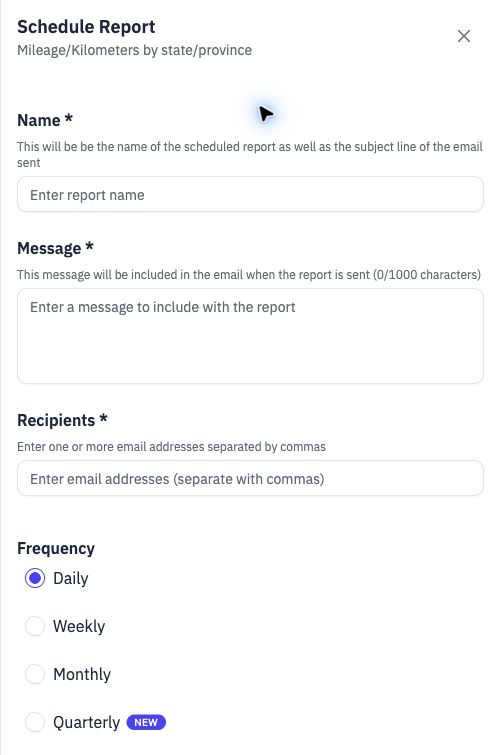
Choose recipients and daily, weekly, monthly or quarterly delivery.
Ask a fleet question while the report is in view.
Schedule the report once.
Mileage alongside everyday fleet work
Review distance in the same app as vehicle tracking and maintenance. Use the right report for the question: what each vehicle drove, where it drove, or what its odometer last reported.
Daily Mileage uses vehicle-tracker data. Vehicle Odometer requires compatible OBD data and a supported vehicle. Check compatibility before choosing a tracker.
Useful answers
Spytec includes three relevant reports: Mileage/Kilometers by state/province, Daily Mileage and Vehicle Odometer. They cover regional distance, day-by-day vehicle distance and reported odometer readings. All three can be exported, scheduled and analyzed with Scout.
Daily Mileage shows the distance each vehicle travels on each day in your selected period. Vehicle Odometer shows the latest reported OBD odometer reading when you select All time. With another date range, it shows the distance the odometer added over that range.
Yes. Daily Mileage includes vehicle rankings, daily fleet totals and a table of distance by vehicle and day. It also identifies vehicles with no activity across the selected range. Today is marked as in progress until the day is complete.
Yes. The Mileage/Kilometers by state/province report groups distance by state or province. Expand a group to see the individual vehicle or tracker distances within it, then export the report when you need a spreadsheet record.
These reports help organize and export vehicle distance and mileage by state or province to support your IFTA recordkeeping. IFTA also requires fuel records and detailed supporting trip or GPS documentation. Mileage summaries alone do not establish full IFTA compliance.
The report shows the latest reading received for each vehicle, with its last-reported time. A vehicle that has not reported recently can have an older reading; stale readings are flagged in the app. Check that time before treating a value as current.
Yes. Mileage/Kilometers by state/province, Daily Mileage and Vehicle Odometer each support CSV export and scheduled delivery. Set recipients and choose daily, weekly, monthly or quarterly delivery for a repeatable review routine.
Yes. All three reports can be analyzed with Scout. Open a report and choose Explore with Scout, then ask a question such as “Which vehicle drove the most miles this week?” or “How far did Van 01 travel on Wednesday?”
The Daily Mileage report uses data from vehicle trackers. The Vehicle Odometer report needs OBD odometer data from a compatible tracker and supported vehicle. Check the tracker and vehicle requirements for the reports you need before choosing your hardware.
Get the daily detail, regional records and vehicle readings you need—without making reporting another job.

Customer Service
Chat with us 24/7

Fast Shipping
Free 2 Day Delivery on Trackers

Hapn App Access
Included with every paid plan

Secure Payment
Your privacy is our priority