Spot risk sooner
See the driving habits and vehicles that need attention.
Driver safety for small-business fleets
See risky driving, understand what happened and give your team useful feedback. Spytec brings vehicle scores, driving events and reports together in the fleet app you already use.
Which vehicles need attention this week?
Van 03 · Score 63 · Needs AttentionSee the driving habits and vehicles that need attention.
Review a real event before you start the conversation.
Bring a useful safety check into your normal fleet routine.
A clearer picture of fleet driver safety
Start with a fleet score, then see how each vehicle is doing. The Needs Attention filter helps you find the vehicles worth a closer look, so you can spend your time where it matters.
Behavior scores run from 0 to 100. Review speeding and harsh-driving events to understand what is behind a score.
Time above mapped road speed limits, with severity detail.
Sudden braking events worth reviewing.
Hard acceleration that needs a closer look.
Sharp turns and cornering events.
Useful details. Better conversations.
Open the event log behind a vehicle’s score. Review the event type, severity and time, then jump into History to see the trip around it.
Talk through what happened with your team. A specific event gives you a practical starting point for feedback.
Progress you can follow
Compare behavior scores across reporting periods to see whether your fleet is moving in the right direction. Follow up on the vehicles that still need attention and recognize improvement when you see it.
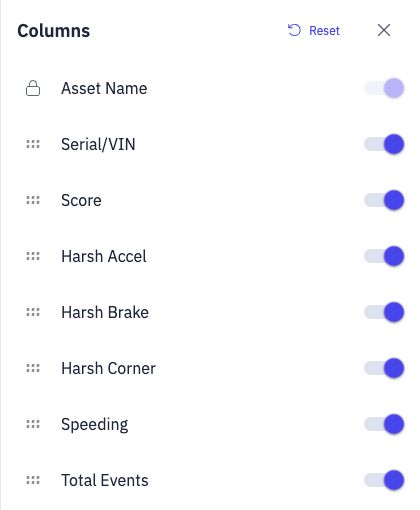
Your report. The details you need.
Less digging. A useful weekly habit.
Choose the date range and columns you need, export a CSV or schedule the report for your team. You get a repeatable check-in without rebuilding the same report each time.
Safety insight alongside fleet tracking
Compatible vehicle-connected trackers capture the data behind driving behavior. Use an OBD or hardwired tracker to bring safety visibility into the same app as your fleet tracking.
Connect through a compatible vehicle’s OBD-II port to track your fleet and review driving behavior.
Explore the OBD tracker →Choose a wired vehicle tracker for fleet location and driving behavior insight in the same app.
Explore the hardwired tracker →Driving behavior features need compatible vehicle-connected hardware. Battery-powered and portable trackers do not provide these driving events.
Driver safety, made practical
Fleet driver safety monitoring uses vehicle tracking data to help you understand driving behavior. Spytec brings fleet and vehicle scores, speeding and harsh-driving events, trip context and reports together, so small-business owners can spot patterns and give their team useful feedback.
Useful answers
Spytec shows speeding, harsh acceleration, harsh braking and harsh cornering with compatible vehicle-connected trackers. The report includes event counts, speeding as a percentage of drive time, and speeding severity detail.
Driving behavior scores are shown for each vehicle and for the fleet. A vehicle score is not automatic identification of the person driving. Use your own vehicle assignments when discussing an event with the team.
Scores run from 0 to 100. The report groups them as Good (85 and above), Fair (70–84) or Needs Attention (below 70). Vehicles need sufficient recent driving data to receive a score; some vehicles may show no score for the selected period.
Yes. Open a vehicle’s event log to review event type, severity and time. Event links open History so you can review the trip and surrounding context.
Yes. The Driving Behavior Report supports CSV export and scheduled delivery. Choose the date range and report columns, then use daily, weekly or monthly delivery to fit your review routine.
A camera is not required for the driving behavior scores and events shown here. You need a compatible vehicle-connected tracker, such as an OBD or hardwired tracker. Video features require a compatible camera.
The app compares recorded vehicle speed with mapped road speed limits. It reports speeding as a percentage of drive time and groups speeding by severity. Mapped limits are not a reading of roadside signs; review the trip context when discussing an event.
Yes. Fleet and vehicle behavior scores help you compare reporting periods and spot patterns. Review changes alongside the events and driving activity behind them to guide your next check-in.
Give your team useful feedback, follow progress and keep safety alongside the fleet tools you already use.

Customer Service
Chat with us 24/7

Fast Shipping
Free 2 Day Delivery on Trackers

Hapn App Access
Included with every paid plan

Secure Payment
Your privacy is our priority