Know when to expect you
A live map and arrival estimate help customers follow the technician’s approach.
Customer ETA for service businesses
Give customers a clear arrival time and keep them informed as your driver gets closer. Live tracking, three arrival texts and replies in one place make every visit easier to coordinate.
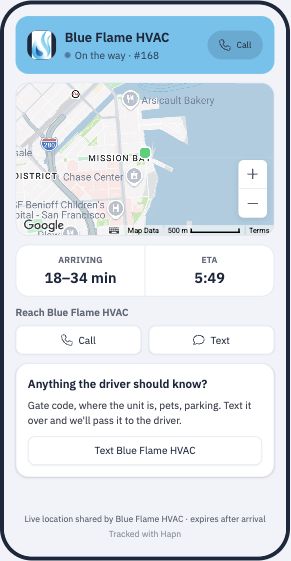
A live map and arrival estimate help customers follow the technician’s approach.
On the way, almost there and arrived—customers stay informed throughout the visit.
Customers text back. Your team manages the conversation inside Customer ETA.
What your customer sees
The customer sees the information they need for the visit, in one place.
Show the technician’s live vehicle location as they head toward the customer.
Give customers an estimated arrival time that updates as the vehicle gets closer.
Add your logo, brand color, business name and phone number, so the customer page feels like part of your service.
Customer-view walkthrough from Spytec’s existing feature page. Example business and times shown.
Arrival updates, without the phone tag
Three arrival texts keep customers informed as the visit progresses. They can open the live tracking link or reply to the text when they need to reach your team.
A conversation that stays with the visit
Gate code? Parking instructions? A quick question? Customers reply to the text, and your team answers inside Customer ETA. Keep the conversation with the visit, including replies after live tracking has ended.
Made for the driver’s working day
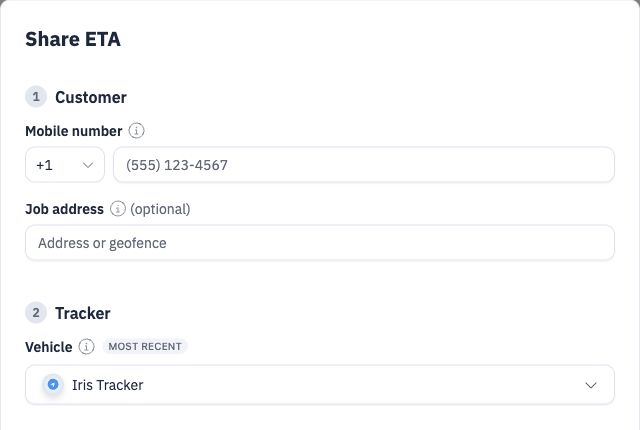
Your driver adds the customer’s phone number and address, chooses the vehicle and shares the ETA. A simple flow that fits into the working day.
Enter the customer’s mobile number and add the job address for the arrival estimate.
Select the tracker on the vehicle heading to the visit, then use Share ETA to send the link by text.
The customer opens the link to see the live map and estimated arrival. No sign-in is needed.
Arrival updates and customer communication
Spytec Customer ETA shows customers where their technician is and when to expect them. A live tracking link and arrival texts keep them informed throughout the visit. Customers can reply by text, and your team handles the conversation inside Customer ETA.
Explore Spytec fleet tracking →Useful answers
Customers receive three arrival updates: on the way, almost there and arrived. The live tracking link lets them follow the vehicle’s approach.
Yes. Customers can reply directly by text. Your team can read incoming messages and send replies inside the Customer ETA job, keeping communication in one place. Replies can still reach the customer after the tracking page has closed.
No. Customers open the Customer ETA link in a browser on their phone or computer. They do not need a Spytec or Hapn account.
The customer view shows the vehicle’s live location, an arrival window, and a clock-time ETA. It also provides call and text options for reaching your office.
Yes. The customer page updates the estimated arrival as the technician gets closer. It is an estimate, rather than a guaranteed arrival time.
The customer’s phone number and job address. In Share ETA, confirm the vehicle and share. The flow is designed to be quick for a driver between stops.
In Customer ETA, choose Share ETA. Enter the customer’s mobile number, add the destination for the arrival estimate, and select the vehicle. Share ETA sends a text with a link the customer can open in their browser.
Live location sharing expires after arrival. This limits ongoing access to the vehicle’s location after the visit.
Yes. Live Links can also share a vehicle’s location for a set time without an ETA. This can be useful when a dispatcher, partner, or subcontractor needs a temporary view of one vehicle.
Yes. Customer ETA settings let you add your logo, brand color, display name and business phone. You can also add review and payment links that appear once the technician arrives.
Spytec trackers use the Hapn tracking platform. That is why you may see Hapn branding on the customer arrival page.
Give customers a clearer arrival time, updates throughout the visit, and an easy way to reach your team.

Customer Service
Chat with us 24/7

Fast Shipping
Free 2 Day Delivery on Trackers

Hapn App Access
Included with every paid plan

Secure Payment
Your privacy is our priority