

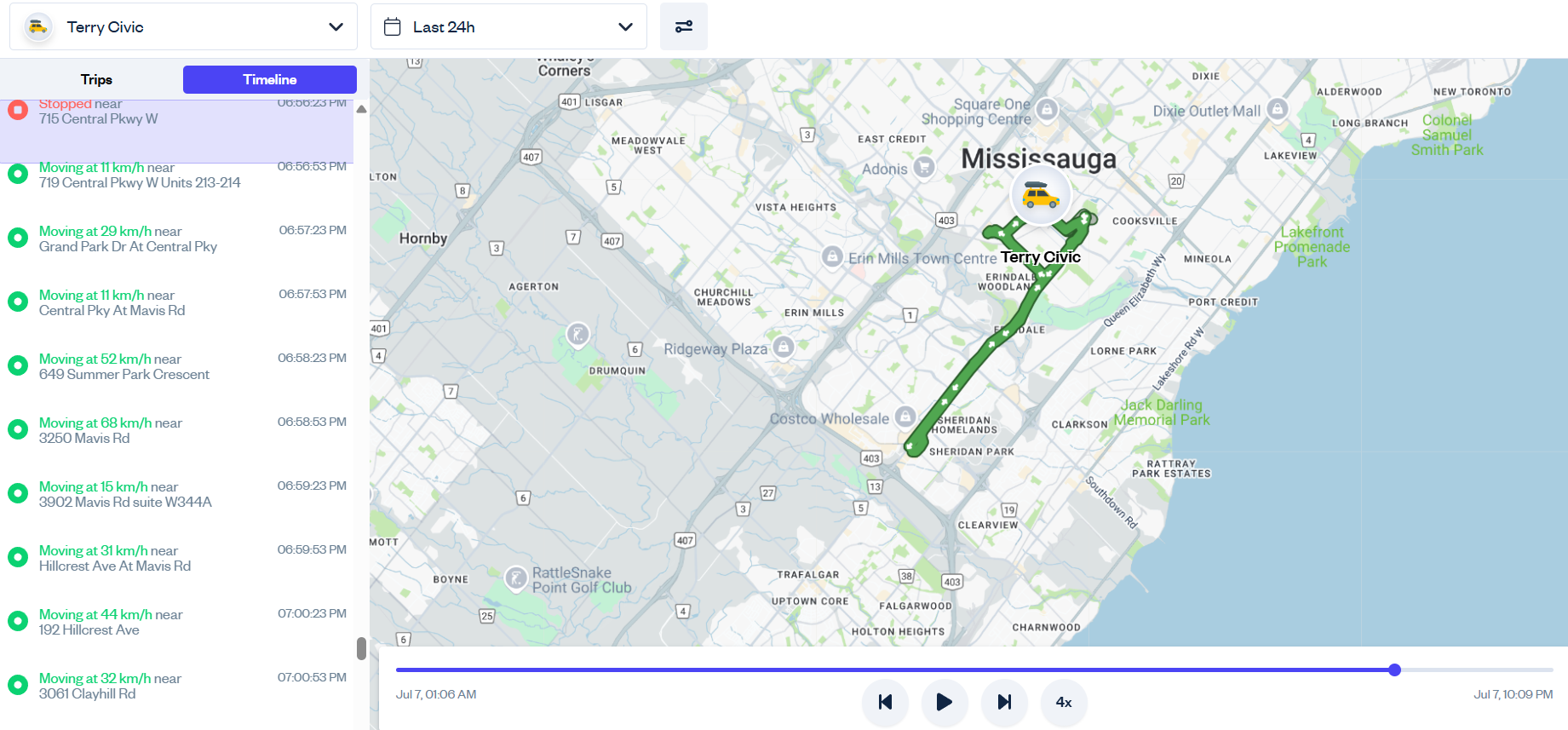
Tracking a GPS tracker’s location in real-time can be very useful in certain situations, but more often than not you’re going to be looking at where they’ve been, not where they are. You want to know where they were at certain points in the day, where they stopped, and what their overall route looked like.
Spytec GPS is a self-serve GPS tracking platform for small and mid-size fleets, with plans starting at $8.95/vehicle/month and no long-term contracts.
Fortunately for you, Spytec has just the solution: The Time Machine.
What is Time Machine?
Time Machine is one of the key features of the Hapn app, and allows you to see the past location and history of your GPS tracker. All these records are generated automatically over the course of your tracker’s usage.
→ See fleet tracking plans starting at $14.95/mo
What is Time Machine for?
Whether it’s personal or business applications, Time Machine is an incredible tool for examining the route history of what you’re tracking. Here are just some of the ways our customers have used Time Machine:
-
Tracking fleet driver routes
-
Monitoring movements of children or seniors
-
Monitoring teen driver performance
-
Tracking progress of an item in transit
-
Tracking a stolen item or vehicle
How do I use Time Machine?
Time Machine can be accessed from both the Hapn desktop app and from within the Hapn Mobile App, which is available in both the App Store and Google Play Store.

On the desktop app, go to the navigation menu on the left side of your screen and click “”Historical Tracking” to reveal the TIme Machine menu.

On the mobile app, click on the hamburger menu on the lower right to reveal additional menus, and then click on “Time Machine.”

You will then see a collection of Trips and Stops for the GPS tracking device you selected. If you have multiple devices, or want to see the GPS tracking history for a specific date and time, you can control that with the filters at the top of your screen.
What’s the difference between Trips and Stops
A “Trip” is the movement history of a tracker as it goes from one location to the next. When the tracker stops at a specific point, it has to stay in place for a set amount of time (15 minutes by default) before ending a trip.
Once a trip has ended, it becomes a Stop. Stops are periods where your tracker is in the same place for a given amount of time.
A new Trip is created the next time the tracker moves.

How do I review trip history?
Clicking on a trip will open up a timeline of every time the GPS tracker location was updated during the trip. You can click on any event during the timeline, and the tracker’s location will update to where it was on the map at that time.
You can also click the “Play” button at the bottom of the map to play the entire GPS history timeline from start to finish.

What is the Timeline section?
The Timeline section is simply a stream of all updates generated by the GPS tracker. It’s not separated into trips or stops. Consider it a raw flow of data from the device to the app.
Like trips, scrolling through the timeline will play all of the tracker’s movements throughout the selected period. It’s an efficient way of reviewing the tracker’s movements over an entire day or days, without having to click through different trips and stops.
As you shop for GPS trackers and review your options, keep in mind that all Spytec GPS tracking devices and subscription plans have access to the Time Machine, and is available on both desktop and mobile apps.
If you have any questions about the Time Machine or any other features of the Hapn GPS tracking app, please reach out to our team.

Frequently Asked Questions
Do I need a contract to use Spytec GPS fleet tracking?
No. Spytec GPS operates on month-to-month or annual plans with no long-term contracts. You can cancel anytime without penalty. Plans start at $14.95/vehicle/month (monthly) or $8.95/vehicle/month (annual), and every plan includes a free GPS tracker.
How long does it take to install a GPS tracker on a fleet vehicle?
OBD trackers plug into the port under the steering wheel in about 10 seconds. Hardwired trackers take roughly 60 seconds — connect two wires to the vehicle battery. No mechanic or professional installation needed.
Can I track my vehicles in real time?
Yes. Spytec GPS provides real-time location updates as frequently as every 5 seconds on certain plans. You can view all vehicles on a single map dashboard from your computer or phone, see speed, heading, and stop duration for each vehicle.
What if an employee removes or unplugs the tracker?
Spytec GPS sends an instant alert if a tracker is unplugged or loses power. For covert installations, hardwired trackers can be hidden and wired directly to the vehicle battery, making them virtually undetectable.
Does Spytec GPS work for fleets with fewer than 10 vehicles?
Absolutely. Spytec GPS is built specifically for small and mid-size fleets of 5 to 50 vehicles. There are no minimum vehicle requirements, and you get the same features whether you track 3 vans or 50 trucks.
Ready to see your fleet in real time?
Free tracker with every plan. No contracts. Ships in 2 days.
Shop Fleet Trackers →






Share:
What is Real-Time Asset Tracking?
What is IoT?